Orchestrator
Contents
Orchestrator
The Orchestrator is an in-memory database that is launched prior to all other
entities within an Experiment. The Orchestrator can be used to store and retrieve
data during the course of an experiment and across multiple entities. In order to
stream data into or receive data from the Orchestrator, one of the SmartSim clients
(SmartRedis) has to be used within a Model.
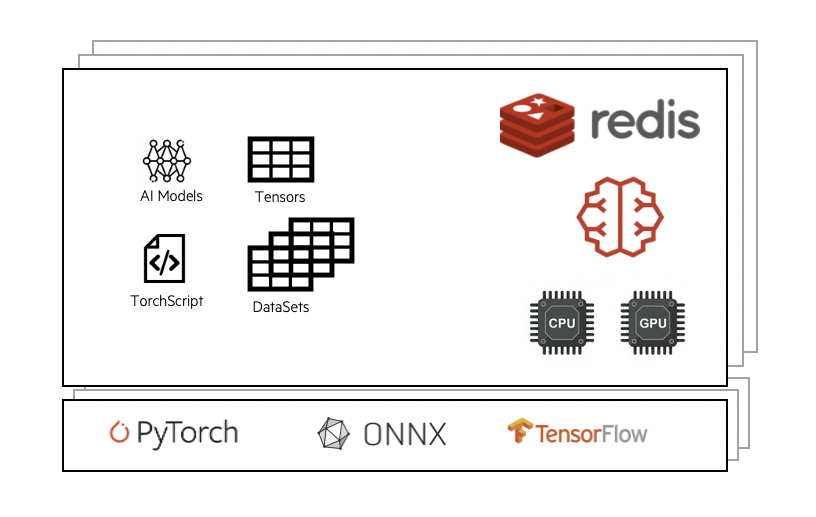
Combined with the SmartRedis clients, the Orchestrator is capable of hosting and executing
AI models written in Python on CPU or GPU. The Orchestrator supports models written with
TensorFlow, Pytorch, TensorFlow-Lite, or models saved in an ONNX format (e.g. sci-kit learn).
Cluster Orchestrator
The Orchestrator supports single node and distributed memory settings. This means
that a single compute host can be used for the database or multiple by specifying
db_nodes to be greater than 1.
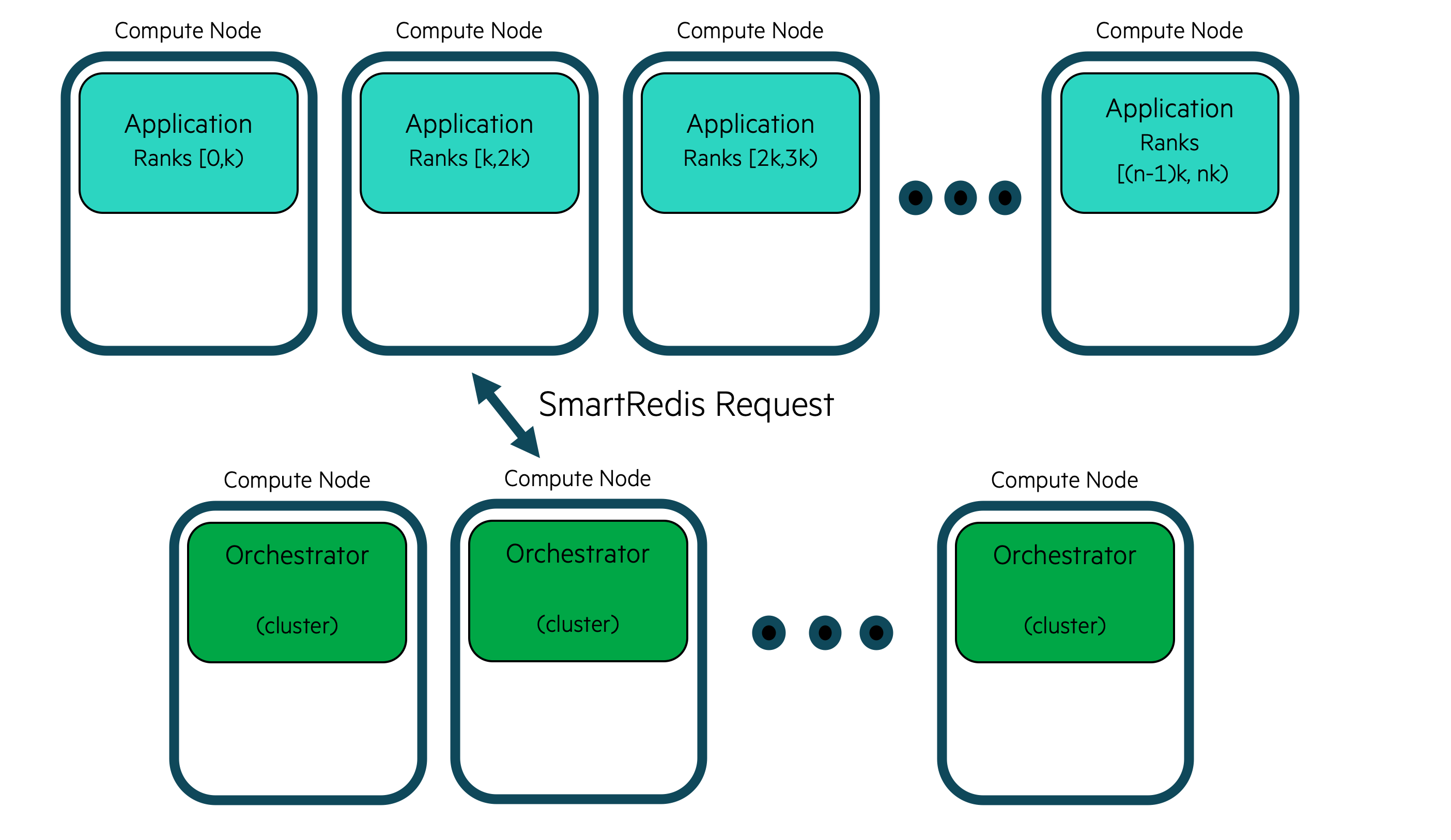
With a clustered Orchestrator, multiple compute hosts memory can be used together
to store data. As well, the CPU or GPU(s) where the Orchestrator is running can
be used to execute the AI models, and Torchscript code on data stored within it.
Users do not need to know how the data is stored in a clustered configuration and can address the cluster with the SmartRedis clients like a single block of memory using simple put/get semantics in SmartRedis. SmartRedis will ensure that data is evenly distributed amoungst all nodes in the cluster.
The cluster deployment is optimal for high data throughput scenarios such as online analysis, training and processing.
Colocated Orchestrator
A colocated Orchestrator is a special type of Orchestrator that is deployed on
the same compute hosts an a Model instance defined by the user. In this
deployment, the database is not connected together in a cluster and each
shard of the database is addressed individually by the processes running
on that compute host.
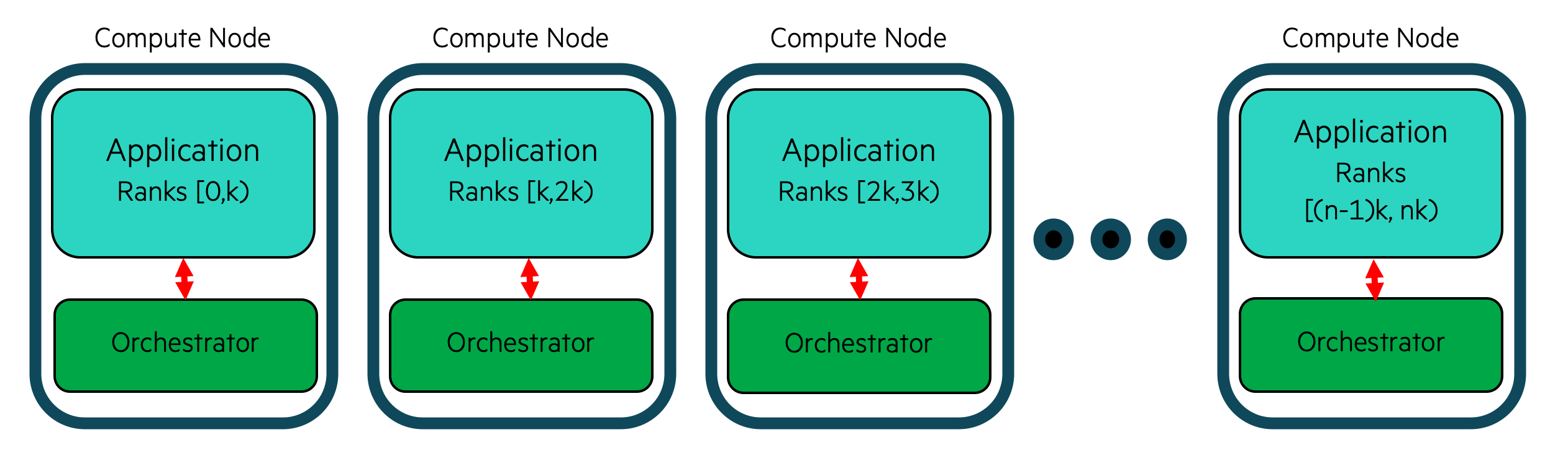
This deployment is designed for highly performant online inference scenarios where a distributed process (likely MPI processes) are performing inference with data local to each process.
This method is deemed locality based inference since data is local to each
process and the Orchestrator is deployed locally on each compute host where
the distributed application is running.
To create a colocated model, first, create a Model instance and then call
the Model.colocate_db_tcp or Model.colocate_db_uds function.
- Model.colocate_db_tcp(port: int = 6379, ifname: t.Union[str, list[str]] = 'lo', db_cpus: int = 1, custom_pinning: t.Optional[t.Iterable[t.Union[int, t.Iterable[int]]]] = None, debug: bool = False, **kwargs: t.Any) None[source]
Colocate an Orchestrator instance with this Model over TCP/IP.
This method will initialize settings which add an unsharded database to this Model instance. Only this Model will be able to communicate with this colocated database by using the loopback TCP interface.
Extra parameters for the db can be passed through kwargs. This includes many performance, caching and inference settings.
ex. kwargs = {
    maxclients: 100000,
    threads_per_queue: 1,
    inter_op_threads: 1,
    intra_op_threads: 1,
    server_threads: 2 # keydb only
}
Generally these don’t need to be changed.
- Parameters
port (int, optional) – port to use for orchestrator database, defaults to 6379
ifname (str | list[str], optional) – interface to use for orchestrator, defaults to “lo”
db_cpus (int, optional) – number of cpus to use for orchestrator, defaults to 1
custom_pinning (iterable of ints or iterable of ints, optional) – CPUs to pin the orchestrator to. Passing an empty iterable disables pinning
debug (bool, optional) – launch Model with extra debug information about the colocated db
kwargs (dict, optional) – additional keyword arguments to pass to the orchestrator database
- Model.colocate_db_uds(unix_socket: str = '/tmp/redis.socket', socket_permissions: int = 755, db_cpus: int = 1, custom_pinning: Optional[Iterable[Union[int, Iterable[int]]]] = None, debug: bool = False, **kwargs: Any) None[source]
Colocate an Orchestrator instance with this Model over UDS.
This method will initialize settings which add an unsharded database to this Model instance. Only this Model will be able to communicate with this colocated database by using Unix Domain sockets.
Extra parameters for the db can be passed through kwargs. This includes many performance, caching and inference settings.
example_kwargs = {
    "maxclients": 100000,
    "threads_per_queue": 1,
    "inter_op_threads": 1,
    "intra_op_threads": 1,
    "server_threads": 2 # keydb only
}
Generally these don’t need to be changed.
- Parameters
unix_socket (str, optional) – path to where the socket file will be created
socket_permissions (int, optional) – permissions for the socketfile
db_cpus (int, optional) – number of cpus to use for orchestrator, defaults to 1
custom_pinning (iterable of ints or iterable of ints, optional) – CPUs to pin the orchestrator to. Passing an empty iterable disables pinning
debug (bool, optional) – launch Model with extra debug information about the colocated db
kwargs (dict, optional) – additional keyword arguments to pass to the orchestrator database
Here is an example of creating a simple model that is colocated with an
Orchestrator deployment using Unix Domain Sockets
from smartsim import Experiment
exp = Experiment("colo-test", launcher="auto")

colo_settings = exp.create_run_settings(exe="./some_mpi_app")

colo_model = exp.create_model("colocated_model", colo_settings)
colo_model.colocate_db_uds(
        db_cpus=1,              # cpus given to the database on each node
        debug=False             # include debug information (will be slower)
        ifname=network_interface # specify network interface(s) to use (i.e. "ib0" or ["ib0", "lo"])
)
exp.start(colo_model)
By default, SmartSim will pin the database to the first _N_ CPUs according to db_cpus. By
specifying the optional argument custom_pinning, an alternative pinning can be specified
by sending in a list of CPU ids (e.g [0,2,range(5,8)]). For optimal performance, most users
will want to also modify the RunSettings for the model to pin their application to cores not
occupied by the database.
Warning
Pinning is not supported on MacOS X. Setting custom_pinning to anything
other than None will raise a warning and the input will be ignored.
Note
Pinning _only_ affects the co-located deployment because both the application and the database are sharing the same compute node. For the clustered deployment, a shard occupies the entirerty of the node.
Redis
The Orchestrator is built on Redis. Largely, the job of the Orchestrator is to
create a Python reference to a Redis deployment so that users can launch, monitor
and stop a Redis deployment on workstations and HPC systems.
Redis was chosen for the Orchestrator because it resides in-memory, can be distributed on-node
as well as across nodes, and provides low latency data access to many clients in parallel. The
Redis ecosystem was a primary driver as the Redis module system provides APIs for languages,
libraries, and techniques used in Data Science. In particular, the Orchestrator
relies on RedisAI to provide access to Machine Learning runtimes.
At its core, Redis is a key-value store. This means that put/get semantics are used to send messages to and from the database. SmartRedis clients use a specific hashing algorithm, CRC16, to ensure that data is evenly distributed amongst all database nodes. Notably, a user is not required to know where (which database node) data or Datasets (see Dataset API) are stored as the SmartRedis clients will infer their location for the user.
KeyDB
KeyDB is a multi-threaded fork of Redis that can be swapped in as the database for
the Orchestrator in SmartSim. KeyDB can be swapped in for Redis by setting the
REDIS_PATH environment variable to point to the keydb-server binary.
A full example of configuring KeyDB to run in SmartSim is shown below
# build KeyDB
# see https://github.com/EQ-Alpha/KeyDB

# get KeyDB configuration file
wget https://github.com/CrayLabs/SmartSim/blob/d3d252b611c9ce9d9429ba6eeb71c15471a78f08/smartsim/_core/config/keydb.conf

export REDIS_PATH=/path/to/keydb-server
export REDIS_CONF=/path/to/keydb.conf

# run smartsim workload